Functools in Machine Learning
Introduction:
You're working on a machine learning project: Your model prediction function is slow because it performs the same calculations repeatedly for the same inputs.
- You've written a complex data preprocessing function, and you notice it's running the same operations on the same data multiple times, wasting time and resources.
- You've created a custom class to represent your data, but now you need to compare and sort instances of this class, which requires writing multiple comparison methods.
👉 This is where
functoolscomes in.
What is functools?
functools is a module in Python's standard library that provides higher-order functions and operations on callable objects (Functions, Classes, Built-in Functions, etc.)
Higher-Order Functions:
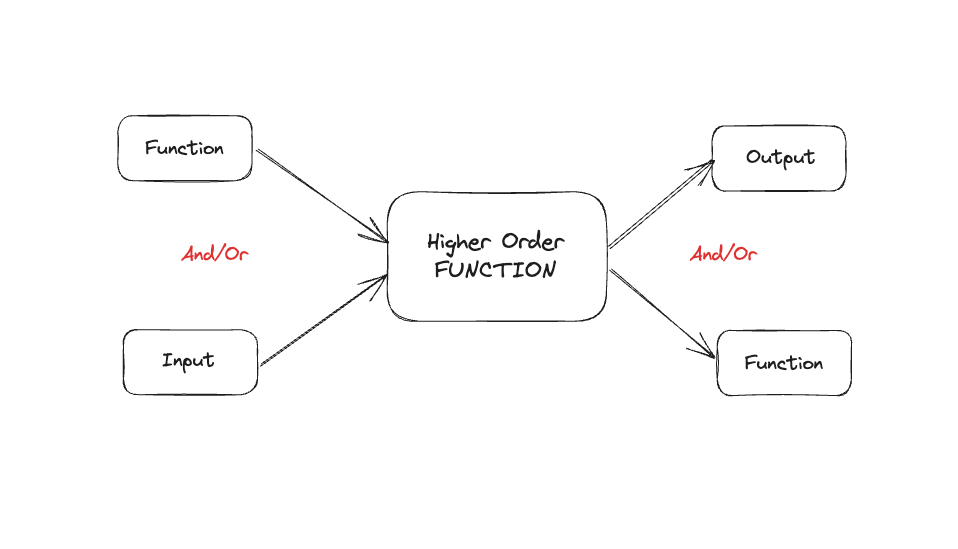
Higher-order functions are:
- functions that can either take other functions as arguments
- return functions as their results.
 Click to zoom
Let's look at a simple example to understand this better:
1def apply_operation(func, x, y):
2    return func(x, y)
3def add(a, b):
4    return a + b
5def multiply(a, b):
6    return a * b
7# Using the higher-order function
8result1 = apply_operation(add, 5, 3)
9print(result1)  # Output: 8
10result2 = apply_operation(multiply, 5, 3)
11print(result2)  # Output: 15
In this example:
apply_operationis a higher-order function because it takes another function (func) as an argument.- We can pass different functions (
addormultiply) toapply_operation, and it will use whichever function we provide.
Higher-Order Functions in Machine Learning example:
1import numpy as np
2def apply_to_dataset(func, dataset):
3    return func(dataset)
4def normalize(dataset):
5    return (dataset - np.mean(dataset)) / np.std(dataset)
6def standardize(dataset):
7    return (dataset - np.min(dataset)) / (np.max(dataset) - np.min(dataset))
8# Sample dataset
9data = np.array([1, 2, 3, 4, 5])
10# Apply different preprocessing functions using apply_to_dataset
11normalized_data = apply_to_dataset(normalize, data)
12standardized_data = apply_to_dataset(standardize, data)
13print("Normalized:", normalized_data)
14print("Standardized:", standardized_data)
In this ML-related example, apply_to_dataset is a higher-order function that can apply any preprocessing function to our dataset.
We can easily switch between different preprocessing methods (normalize or standardize) without changing the main function.
Key Functions in functools
1. functools.partial
The partial function from the functools module is a powerful tool that allows you to "freeze" some portion of the function's arguments, creating a new function that you can call with fewer arguments. This is particularly useful for reusing functions with different fixed arguments.
Example:
1from functools import partial
2def greet(greeting, name):
3    return f"{greeting}, {name}!"
4# Creating a new function 'hello' where the 'greeting' argument is pre-set to "Hello"
5hello = partial(greet, "Hello")
6# Now, you only need to pass the 'name' argument when calling 'hello'
7print(hello("Alice"))  # Output: Hello, Alice!
8print(hello("Bob"))    # Output: Hello, Bob!
- The
partialfunction is used to create a new function,hello, which is a version of thegreetfunction where thegreetingargument is pre-set to "Hello". - When you call
hello("Alice"), it effectively callsgreet("Hello", "Alice"). - This is very useful when you need to reuse the same function but with some arguments already fixed.
Real-world use case:
For instance, if you are working with a mathematical function that frequently requires the same parameters, you can use partial to simplify your code and reduce redundancy.
2. functools.lru_cache
lru_cache is a decorator that implements memoization, caching a function's results based on its arguments.
Example:
1from functools import lru_cache
2# Counter to keep track of function calls
3call_counter = 0
4@lru_cache(maxsize=None)
5def fibonacci(n):
6    global call_counter
7    call_counter += 1  # Increment the counter each time the function is called
8    if n < 2:
9        return n
10    return fibonacci(n-1) + fibonacci(n-2)
11# Compute the Fibonacci number for 100
12print(f"Fibonacci(100): {fibonacci(100)}")
13# Verify how many times the function was called
14print(f"Function was called {call_counter} times.")
Output:
1Fibonacci(100): 354224848179261915075
2Function was called 101 times.
In this case, fibonacci(100) is computed efficiently with only 101 calls to the function (instead of an exponentially large number without caching).
3. functools.cache
cache is similar to lru_cache but provides simpler syntax for unlimited caching.
Example:
1from functools import cache
2# Counter to track the number of function calls
3call_counter = 0
4@cache
5def expensive_computation(x):
6    global call_counter
7    call_counter += 1  # Increment the counter each time the function is called
8    # Simulate an expensive operation
9    return x ** 2
10# First call - function is computed
11print(expensive_computation(10))  # Output: 100 (computed)
12# Second call - result is retrieved from the cache
13print(expensive_computation(10))  # Output: 100 (cached)
14# Verify how many times the function was called
15print(f"Function was called {call_counter} times.")
1100  # Computed
2100  # Retrieved from cache
3Function was called 1 times.
This output verifies that the second call retrieves the result from the cache rather than recomputing it.
4. functools.total_ordering
total_ordering is a class decorator that fills in missing comparison methods in a class that defines at least one comparison method.
Example:
1from functools import total_ordering
2@total_ordering
3class Person:
4    def __init__(self, name, age):
5        self.name = name
6        self.age = age
7    def __eq__(self, other):
8            return self.age == other.age
9    def __lt__(self, other):
10            return self.age < other.age
11p1 = Person("Alice", 30)
12p2 = Person("Bob", 25)
13print(p1 > p2)  # True
Why functools is Valuable in Machine Learning
In machine learning projects, we often deal with complex, computationally expensive operations, large datasets, and the need for flexible, reusable code. functools provides tools that can help address these challenges.
Let's explore the main functions in functools and see how they can be applied in ML contexts.
1. functools.partial
What: partial creates a new function with some of the arguments of the original function pre-set.
Why it's useful in ML:
- Simplifies the creation of specialized functions from more general ones
- Helps in creating consistent preprocessing or model configuration functions Example in ML:
1from functools import partial
2from sklearn.ensemble import RandomForestClassifier
3# Create a partially configured RandomForest
4rf_classifier = partial(RandomForestClassifier,
5                        n_estimators=100,
6                        random_state=42)
7# Now you can create classifiers with different max_depths easily
8clf_shallow = rf_classifier(max_depth=5)
9clf_deep = rf_classifier(max_depth=15)
10# This is especially useful in grid search or pipelines
11from sklearn.model_selection import GridSearchCV
12param_grid = {'max_depth': [5, 10, 15, 20]}
13grid_search = GridSearchCV(rf_classifier(), param_grid, cv=5)
14# You can fit this grid_search object to your data
15# grid_search.fit(X, y)
In this example, partial allows us to create a base RandomForest configuration, making it easier to experiment with different max_depth values while keeping other parameters constant.
2. functools.lru_cache
What: lru_cache is a decorator that caches the results of a function, avoiding repeated computations for the same inputs.
Why it's useful in ML:
- Speeds up expensive computations, especially in feature engineering or model inference
- Reduces redundant calculations in iterative processes like cross-validation Example in ML:
1from functools import lru_cache
2import numpy as np
3@lru_cache(maxsize=100)
4def expensive_feature_computation(data):
5    # Simulate an expensive computation
6    return np.mean(np.array(data) ** 2)
7# In your feature engineering pipeline
8def engineer_features(dataset):
9    return [expensive_feature_computation(tuple(row)) for row in dataset]
10# The function will only compute for unique rows, reusing cached results
11dataset = [(1, 2, 3), (4, 5, 6), (1, 2, 3)]
12features = engineer_features(dataset)
13print(features)
Here, lru_cache ensures that the expensive feature computation is only done once for each unique input, significantly speeding up the feature engineering process for datasets with repeated or similar samples.
3. functools.cache
What: Similar to lru_cache, but with no size limit on the cache.
Why it's useful in ML:
- Ideal for pure functions with a limited input domain
- Useful in recursive algorithms or dynamic programming approaches in ML Example in ML:
1from functools import cache
2@cache
3def fibonacci(n):
4    if n < 2:
5        return n
6    return fibonacci(n-1) + fibonacci(n-2)
7# This can be used in feature engineering or certain ML algorithms
8def fib_feature(x):
9    return fibonacci(int(x))
10# Apply to a dataset
11dataset = [5, 8, 13, 5, 8]
12fib_features = [fib_feature(x) for x in dataset]
13print(fib_features)
While this is a simple example, it demonstrates how cache can optimize recursive computations, which could be part of more complex feature engineering or custom ML algorithms.
4. functools.total_ordering
What: A class decorator that automatically generates ordering methods (__lt__, __gt__, etc.) based on __eq__ and one other comparison method.
Why it's useful in ML:
- Simplifies the creation of custom, comparable objects (e.g., for custom metrics or model results)
- Useful in sorting or ranking scenarios in ML pipelines Example in ML:
1from functools import total_ordering
2@total_ordering
3class ModelPerformance:
4    def __init__(self, accuracy, f1_score):
5        self.accuracy = accuracy
6        self.f1_score = f1_score
7
8    def __eq__(self, other):
9        return (self.accuracy, self.f1_score) == (other.accuracy, other.f1_score)
10
11    def __lt__(self, other):
12        return (self.accuracy, self.f1_score) < (other.accuracy, other.f1_score)
13# Now you can easily compare model performances
14model1 = ModelPerformance(0.85, 0.82)
15model2 = ModelPerformance(0.82, 0.85)
16print(model1 > model2)  # True
17print(max(model1, model2))  # ModelPerformance(0.85, 0.82)
18# This is useful for sorting model results
19models = [ModelPerformance(0.8, 0.75), ModelPerformance(0.85, 0.8), ModelPerformance(0.82, 0.78)]
20best_model = max(models)
21print(f"Best model: Accuracy {best_model.accuracy}, F1 {best_model.f1_score}")
This example shows how total_ordering can be used to create a custom class for model performance that can be easily compared and sorted, which is often necessary in model selection or ensemble methods.
5. Putting It All Together: functools in a ML System:
Here's a simple example showing how you might use functools in different parts of a machine learning system:
1from functools import lru_cache, partial, cache
2import numpy as np
3from sklearn.ensemble import RandomForestClassifier
4# Data handling
5@cache
6def load_data(file_name):
7    # Pretend we're loading data from a file
8    return np.random.rand(1000, 10)
9# Model setup
10base_model = partial(RandomForestClassifier, n_estimators=100, random_state=42)
11# Model evaluation
12@lru_cache(maxsize=10)
13def evaluate_model(model, X, y):
14    # Pretend we're doing cross-validation here
15    return np.mean(model.predict(X) == y)
16# Prediction function
17@lru_cache(maxsize=1000)
18def predict(model, features):
19    return model.predict([features])[0]
20# Using these functions
21X = load_data("fake_data.csv")
22y = np.random.randint(0, 2, 1000)  # Fake labels
23model = base_model(max_depth=5)
24model.fit(X, y)
25print(f"Model score: {evaluate_model(model, tuple(map(tuple, X)), tuple(y))}")
26# Pretend API call
27print(f"Prediction: {predict(model, tuple(X[0]))}")
Conclusion
Throughout this tutorial, we've explored how the functools module can be a powerful ally in your machine learning and MLOps workflows. Let's recap the key takeaways:
- Efficiency Boost: Functions like
lru_cacheandcachecan significantly speed up your ML pipelines by avoiding redundant computations. This is particularly valuable in scenarios involving expensive feature engineering or repeated model inferences. - Flexibility in Code:
partialallows you to create specialized versions of functions, making it easier to experiment with different model configurations or preprocessing steps. This flexibility is crucial in the iterative nature of ML development. - Simplified Comparisons:
total_orderingsimplifies the creation of custom, comparable objects, which can be invaluable when dealing with complex model metrics or custom performance measures. - Cleaner, More Maintainable Code: By leveraging these tools, you can write more modular and reusable code, which is essential in managing the complexity of ML projects.
- Optimized Resources: Proper use of
functoolscan lead to more efficient use of computational resources, a critical factor when working with large datasets or complex models
References:
[1] https://docs.python.org/3/library/functools.html
[2] https://www.geeksforgeeks.org/functools-module-in-python/
[3] https://towardsdatascience.com/introducing-pythons-functools-module-2c4cba4774e